I am working for a big retail client and we
follow an inception technique which is very lean and effective. The technique
is definitely leveraging Eric Ries's Lean Startup and Jeff Patton User Story mapping fundamentals but has been
tailored for enterprise need. This technique address few core questions:
- How to ensure
the team starts the project with a shared understanding and an effective
plan?
- How to
understand the MVP and start an agile project as quickly as
possible?
This method is based on Paulo Caroli's book
called "To
The Point". This technique has some obvious benefits:
- It
focuses on validate hypothesis based project development - Build, Measure
and Lean approach.
- Team
comes out of inception with a value associated to every feature.
- Team
completes higher-level features in less than a week time for a 6 to 9
months long project.
- Saves
the work/time of breaking down all the projects work in order to get an
estimate for project's length/cost.
- Entire
team get a holistic picture of the product
- Release
planning can be done very quickly based on the features
This is a technique to understand and plan for
incremental delivery of MVPs. The technique organizes ideas and features in a
model that seeks to understand the main purpose of project. It suggests some
pre-defined steps.
- Describe
the product vision
- Prioritize
the business goal
- Describe
the main users, their profiles and their needs
- Understand
the main functionalities
- Detail
perceptions of risk, effort and business value by functionality
- Describe
the most important user journeys
- Create
an incremental product enhancement plan, driven by MVP
- Estimate
effort by sampling
- Calculate
costs and specify dates and delivery schedule
We
consolidated above steps in 7 high level categories:
- Create
the product's Vision;
- Define
the product's Objectives;
- Identify
the product's Personas;
- Discover
the product's Features;
- Associate
features to Risk, Effort and Value - Review;
- Plan
the product's Releases;
- Consolidate Time
and Cost.
Lets
discuss each step in details:
Project Vision
--------------------
Somewhere
between the idea and the launching, the vision of the project helps team to
understand the business value. In our situation project was pretty identified
and had a clear goals. Hence I requested our Product Owners (POs) to come up
with initial project vision and asked to field team’s questions. Book suggests
involving entire team but I would suggest starting with PO if you are building
a project, which has been well thought by PO. This saves lots of teams frustration,
which we faces during initial adaptation phase of this technique. I would
suggest you should engage your team if you are building a product whose scope
has not been defined or loosely defined. It definitely helps team in getting aligned
around the product they're building, creating a clear vision of the path ahead.
Ask team to think about product vision in below format.
For
[final client],
whose
[problem that needs to be solved],
the
[name of the product]
is a
[product category]
that
[key-benefits, reason to buy it].
Different
from [competition alternative],
our
product [key-difference]
Project
Objective
--------------------
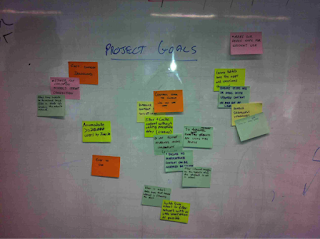
Each
team member must share what is his/her understanding of an objective for those
who use the product, and the several points of view must be discussed in order
to reach a consensus on what is really important. This activity helps raising
and clearing these objectives. I again
started with PO first and then asked team members to shares theirs
objective. The main aim is to know where
project is going, and what it aims to achieve, ensuring a good mix of technical
and business objectives are captured.
Once
the vision is defined then try group they by similarity and prioritize them
collaboratively. To prioritize, answer this question: "If your
company only has time and money for one more objective, which would it
be?"
Once
goals/objectives are captured, do the activity of understanding trade-offs.
Trade-off is a trade in which you let go something in order to get another one
you want more. A lean product reflects decisions of the team regarding
trade-offs. The activity “Understanding trade-offs” helps building and
recording a common understanding about trade-offs of the lean product. Many
decisions and conversations are based on individual visions and premises
between choices. Some examples: what is most valuable: security or usability?
And what about performance and security? And usability and performance? This
activity promotes an open and collaborative conversation on trade-offs. Clearer
trade- offs avoid misunderstandings and help to make decisions quickly. Below picture is taken from the book to show
the outcome of the trade-offs.
Project
Personas
------------------------
To build right
thing that will provide the most value, you need to keep in mind who is using
your product, and what are their needs. A persona represents a user in the
system, describing not only his role but also his specific needs, creating a
realistic representation of users, helping the team to describe functionalities
from the point of view of those who will interact with the final product. Book suggests couple of ways to come up with
them. We preferred answering below questions:
·
Who has a stake in our product?
·
What exactly do they need from our product?
Once
you have the list of personas, try answering below questions in groups:
What, I
____ (see / think / hear / say)?
Project
Features
----------------------
Feature is the description of an action or interaction of a user
with the product. For example: print invoice, see detailed statement, and
invite facebook friends…
The description of a feature should be as simple as possible.
The user is trying to do something. The product should have a feature for that.
To discover features make your team think about below questions:
What the product needs to do or have in order to enable the
Personas to achieve the Objectives?
In a big table or whiteboard, place the cards with Personas as
rows and the cards with Objectives as columns. Then, starting from the most
important Objective, brainstorm on what features should be built to achieve
each Objective. This technique is more like Story Mapping, where you are
mapping Objectives and Persona’s need and coming up with actions/features. I am
not allowed to share my project real data, hence again copied from the book for
reference.
Feature Review
---------------------
To plan the work and the releases, it's important to understand
the levels of risk, effort and value in each feature identified by the team.
This is again similar concept like story-mapping, focusing on specific target
outcomes is the secret to prioritizing development work. This activity aims to
discuss how the team feels according to the technical certainty and the
business agreement for each feature.
Create a common canvas, a graphic, in which the axis X
represents the technical certainty (how to do) and the axis Y represents the
business agreement to the requirement (what to do).
Ask for a member of the team to read a feature out loud and put
it on the canvas according to his/her understanding of it (technical certainty
and business agreement).
Question if everyone in the team share the same
opinion. Of somebody disagrees, the team must discuss the requirements and the
technology involved in a way that an agreement is reached about the feature.
Everything that is mentioned and that helps to achieve a better understanding
must be noted and attached to the feature. The picture above shows features in
post-its that were glued in green, yellow or pink index cards, indicating low,
medium or high uncertainty levels, respectively.
Repeat the exercise for each
identified features.
Create one more canvas, which has Effort (the level of the work
that needs to be done) and Value (what is the return or saving that it will
bring) as their axis. Rank each Feature with the following options:
The activities Technical Certainty and Business Agreement and
Effort and Business Value can and should be held together. In the first
activity the feature gets a color. On the second activity, the feature gets two
marks. The color represents the feature ́s uncertainty level: Red for a high level of uncertainty, Yellow for a medium level of uncertainty, and Green for a low level of uncertainty. The marks are about effort and
business value, and vary on a scale of one, two or three times in comparison to
each other; for example E, EE, and EEE. Such color and marks will help the team
in subsequent activities to prioritize, estimate and plan.
Project Release Roadmap
----------------------------------
Book suggests mapping the User Journey but we moved to release
planning after the above outcome. I would say, do what you feel right for your
project.
Based on the feature ranking now it’s time to group features
together. We focused on creating multiple slices, which has equal balance of
risk, effort, and value. Our main focus was building features, which will prove
our idea was worth building and we can learn something for future features. We
definitely selected sea level features first. Also we tried to make sure each
slice can be achieved in less than 3 months and they are almost equal. We
focused on measurement pieces of the feature. This is key exercise and requires lots energy
and communication.
Project Budget
---------------------
We can’t move inch further in enterprise
world without telling leadership, how much would it cost J. I did spend few days in
Jira learning team’s working pattern by studying control charts and other
reports across multiple projects. Based on my observation I created three big
buckets. (Small, Medium and Large). We as a team agreed on a time range for
each bucket. We start picking each slice and placed each feature into the big
bucket. We only did this exercise for first two slices and left the rest of
slices as is. Once we had rough timeline it was easy to put together budget for
senior management for approval.
We did couple of mini-inceptions with
external teams i.e. Risk/Infrastructure/Compliance/Security/Other dependent
team etc. and adjusted the notes at feature level based on their feedback. We
came up with multiple spikes for our iteration zero at the end of inception
close and roadmap for project.
Let me know your feedback.
Thanks
Manisha


